Project Overview :
● NumPy is an essential module for carrying out data science operations efficiently.
● NumPy stands for Numerical Python.
● Standard deviation is calculated by taking the square root of a value derived from comparing data points to a collective mean of all values.
● The formula is:
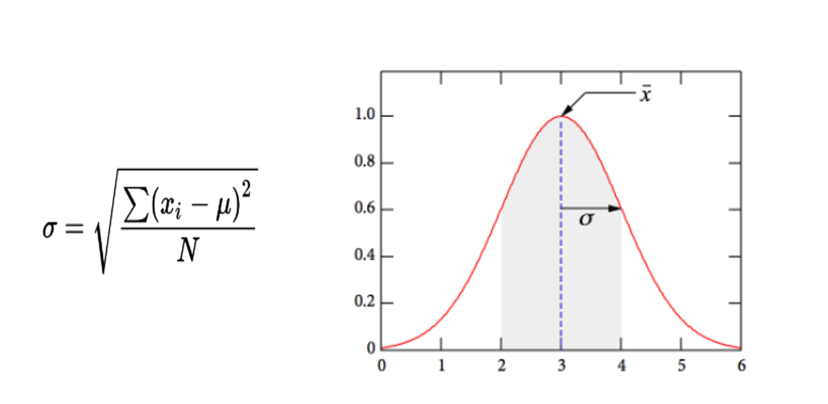
● Where :
1. σ = the standard deviance
2. μ = the mean of all the values (Mean = Sum of the values / Number of values, ∑x/ N)
3. xᵢ = the individual x values
4. x = a value in the data set
5. N = total number of data points or number of values
6. ∑ = sigma notation to sum
7. √ is the square root symbol
Syntax: numpy.std
numpy.std(a, axis=None, dtype=None, out=None, ddof=0, keepdims=<no value>, *, where=<no value>)
● a : Array containing numbers whose variance is desired.
● axis : None or int or tuple of ints, optional.
● dtype : Type to use in computing the variance. For arrays of integer type the default is float64; for arrays of float types it is the same as the array type.
● out : Alternate output array in which to place the result.
● ddof : Interger, “Delta Degrees of Freedom”, the divisor used in the calculation is N - ddof, where N represents the number of elements. By default ddof is zero.
● Keepdims : Boolean, if this is set to True, the axes which are reduced are left in the result as dimensions with size one.
● Where : array_like of bool, optional, elements to include in the variance.
Requirements :
● Python
● VS code
● Library – numpy
Code :
 import numpy

Speed = [32,111,138,28,59,77,97]

x = numpy.std(Speed)

print("Standard_Deviation:", x)
Code Explanation :
● import numpy ->import numpy as np and use it in python. In command prompt or VS code terminal run the below pip command to install numpy library,
● pip3 install numpy # For Python version 3
● Speed = [32,111,138,28,59,77,97]
● x = numpy.std(Speed) -> Find the standard deviation for given array, Speed.
● print("Standard_Deviation:", x)
● Run the code.
Output :
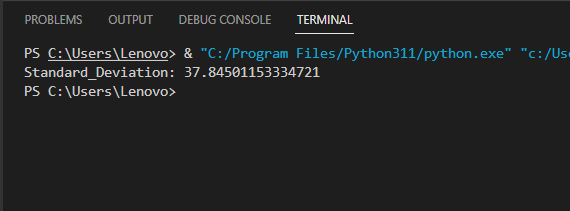
●After running the code, output of the terminal as given below,